



 Apprenticeships
 Construction
 Education Tech
 Engineering
 Franchise Networks
 Healthcare
 Legal Firms
 Logistics
 MATs
MATs Recruitment
 Retail
 Seasonal Staff
FrogLMS Community
Release Date - 24th November 2025
What's new in this release?
Task Quiz Widget
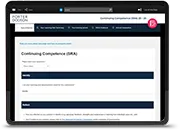
The Task Quiz widget has been enhanced based on customer feedback. Once a learner has completed a quiz and met the widget’s requirements (i.e. met the pass mark score and the activity status is set to “Completed”), the “Open” button will no longer be displayed, even if the learner has remaining attempts.
See below for an example of how the Task Quiz widget now appears to a learner once the requirements have been met and the status is marked as “Completed”.

BUG FIXES
This release includes the following bug fixes:
Data Viewer Widget
- JIRA# NFC-3459 - Resolved an issue where, if a site contained multiple Data Viewer widgets with different preferences configured, those preferences were not applied correctly per widget. This previously caused conflicts, such as one widget allowing submission edits while another did not. Preferences are now respected individually for each widget instance.
Forms
- JIRA# NFC-3457 - Fixed an edge case whereby if a form submission contains a user mentioned in the User Picker field, but the user is archived in the Users app, when the form submission edits are saved they will be successfully saved now.
- JIRA# NFC-3455 - Resolved an issue where forms containing a paragraph field with content exceeding 2,000 characters, along with a User Picker field assigning editing rights, would prevent the mentioned user having their edits to the form submission saved. The user can now successfully add their comments, and all changes will be saved correctly.

A series of guides to help you get the most out of your Frog platform.

Come meet the Frog team at one of our upcoming events.

The latest information on all the FrogLMS product updates!

If you require any extra support please get in touch and we'll be happy to help!
Back to Community Home