


 Apprenticeships
 Construction
 Education Tech
 Engineering
 Franchise Networks
 Healthcare
 Legal Firms
 Logistics
 MATs
MATs Recruitment
 Retail
 Seasonal Staff
FrogLMS Community
Release Date - 23rd December 2025
What's new in this release?
Modules
This release introduces the Media widget within Modules, now available when creating or editing content. The widget works just as it does in Sites, allowing you to upload and display various media types, including images, audio, and videos, directly inline within your module content.
Below is an example of the Media widget in use within a module, displaying an image file.
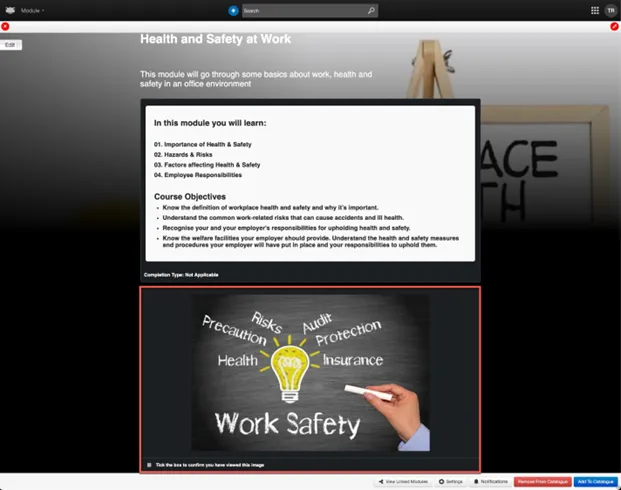
When configuring the Media widget within a module, the following Completion Settings are available:
- Not applicable
- Mark completed manually (default)
- After video is completed
By default, the setting Mark completed manually will be applied when any media file is uploaded.
However, if a video is uploaded to the Media widget, you can optionally change the completion setting to After video is completed, allowing progress to be tracked based on the video’s playback.
Below is an example of the Media widget in use within a module, displaying a video file.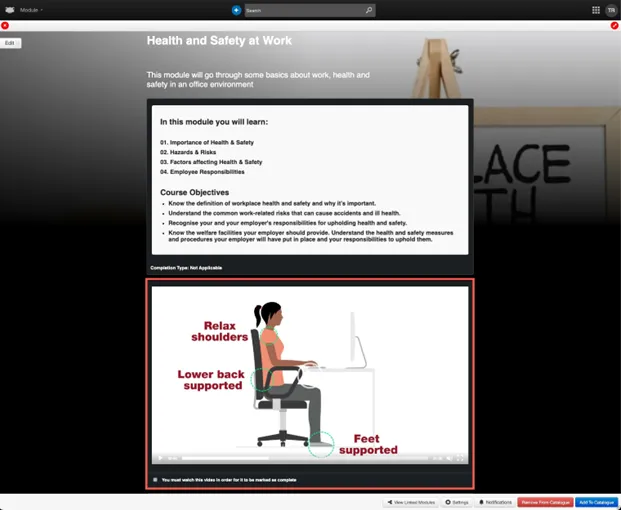
NOTE – If you attempt to apply the After video is completed setting to an image or audio file, the platform will not accept this setting and will automatically revert to Not Applicable.
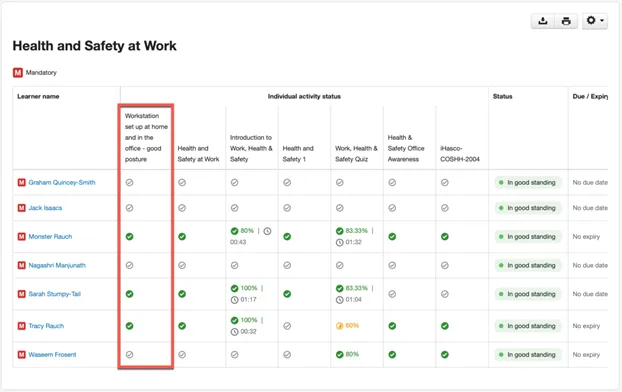
Additionally, the Media widget will be included as a trackable activity within the Module Compliance Report, displaying each user’s current completion status.
In the example below, the Media widget contains a video titled Workstation set up at home and in the office – good posture. You can see the activity listed, along with a green tick for users who have completed the video
BUG FIXES
This release includes the following bug fixes:
Catalogue Widget
- JIRA# NFC-3462 - Within the Catalogue widget, when a user chooses to search for modules by “Title”, the results will now be displayed in alphabetical order within each category.
Data Viewer Widget
- JIRA# NFC-3450 - If a form contains a “File Upload” field and uses a “User Picker” field to assign editing rights, any uploaded files in the submission can now be downloaded and viewed by the nominated user specified in the User Picker field.
Form Widget
- JIRA# NFC-3174 - Validation has been added to the “Send email on submission to” field in the Form widget’s advanced settings, ensuring that any email addresses pasted from third-party systems are correctly formatted.
Image Carousel Widget
- JIRA# NFC-3418 - When using the Image Carousel widget on a site and linking it to a folder in FrogDrive, navigating to Advanced > Advanced Image settings will now correctly display all images within the selected folder. This allows users to append additional information such as a title, description, or URL link to each image.
Layout Block Widget
- JIRA# NFC-3404 - Resolved an issue where widgets placed inside a Layout Block widget could not be moved to a different section within the same Layout Block or outside of it. Such changes will now be saved correctly and reflected as expected.
Reporting Application
- JIRA# NFC-3344 - When running the Group Report, if the report spans multiple pages when downloaded, the module name headers will now correctly appear on subsequent pages.


Back to Community Home