


 Apprenticeships
 Construction
 Education Tech
 Engineering
 Franchise Networks
 Healthcare
 Legal Firms
 Logistics
 MATs
MATs Recruitment
 Retail
 Seasonal Staff
FrogLMS Community
Release Date - 20th April 2026
What's new in this release?
LMS Theming
LMS customers can now further enhance their platform by working with the Frog Design team to customise the look and feel of their environment. This includes additional styling options for the Frog Bar, as well as the ability to add a custom loading icon when users authenticate into the LMS platform or when content is loading.
Below is an example of the Frog Bar being updated from the default black colour to purple, aligning more closely with the dashboard theme.
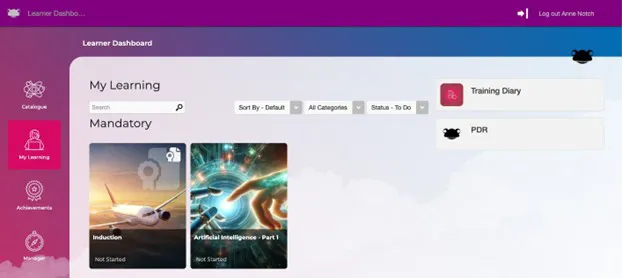
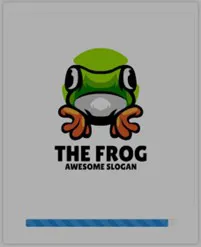
Below is an example of a customised loading icon displayed when users authenticate into the LMS platform.
This feature is available upon request, as additional setup and configuration costs apply. If you are interested in enabling this functionality, please contact the Customer Success Team at customersuccess@frogeducation.com.
Module Summary Report
Frog has introduced a nightly background process that automatically generates a Module Summary Report, which can be accessed via a secure request. This enables external systems, such as Microsoft Power BI, to automatically retrieve the data for analysis alongside other internal systems.
The Module Summary Report includes data for all learners within the LMS platform, capturing their interactions with modules at the point in time the report is generated. The report provides the following fields:
- Module Name
- User UUID (Frog unique identifier)
- User Display Name
- Completed On
- Due By
- Started On
- Expires On
- Renewal From
- Is Compliance
This feature is available upon request, as additional setup and configuration costs apply. If you are interested in enabling this functionality, please contact the Customer Success Team at customersuccess@frogeducation.com.
BUG FIXES
This release includes the following bug fixes:
Forms Widget
- JIRA# NFC-3552 - Resolved an issue where forms containing both a Date Picker field and a User Picker field (used to assign editing rights) prevented the assigned user’s edits from being saved. Users can now successfully edit the form submission, with all changes saved correctly.
Reporting Application
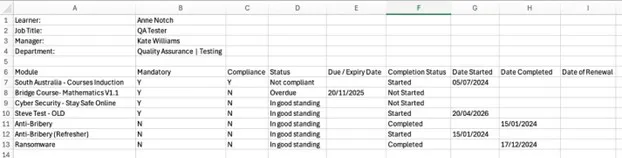
- JIRA# NFC-3527 - The Learner Compliance Report, when exported to CSV, now includes additional fields to ensure the data matches what is displayed within the interface. The three new fields are:
- Date Started
- Date Completed
- Date of Renewal
Sites
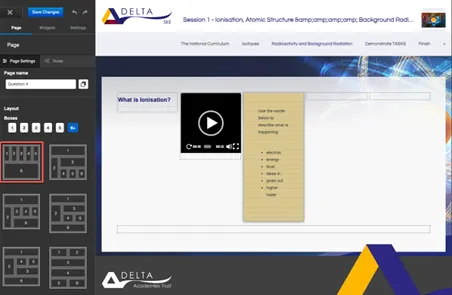
- JIRA# NFC-3558 - When editing a site and navigating to the Page tab, within the Layout section, selecting the 6+ boxes option now includes a new layout that supports displaying five boxes at the top level.
Template Manager
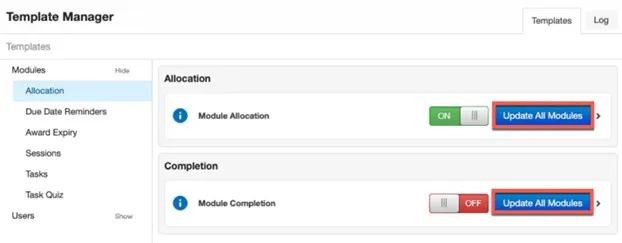
- JIRA# NFC-3528 - Within Template Manager, when updating email notification settings (toggled ON or OFF), there is now the ability to synchronise these settings across all modules within your LMS platform using the new Update All Modules button.
Previously, when a setting was changed to ON or OFF, it applied only to newly created modules, while existing modules retained their current configuration.
With the introduction of the Update All Modules button, these changes can now be applied across all modules, reducing management overhead and ensuring consistency across the platform.
The Update All Modules button is available in the following notification areas:- Modules
- Allocation
- Due Date Reminders
- Award Expiry
- Sessions > Calendar (only)
- Modules


Back to Community Home