


 Apprenticeships
 Construction
 Education Tech
 Engineering
 Franchise Networks
 Healthcare
 Legal Firms
 Logistics
 MATs
MATs Recruitment
 Retail
 Seasonal Staff
FrogLMS Community
Release Date - 27th April 2026
What's new in this release?
Reporting Application
A new report is now available in the Reporting application under Training Reports, titled Multi Department Compliance Report. It allows you to select multiple modules and departments or groups, providing an overview of learner completion percentages for each module by department or group.
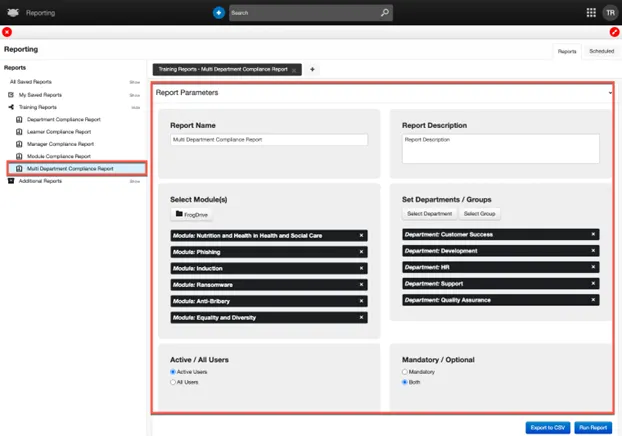
When the report is generated, modules are displayed across the top, with departments or groups listed down the left-hand side. A Total Percentage column is also included, showing overall progress for each department or group. The report can be downloaded as either a PDF or CSV.
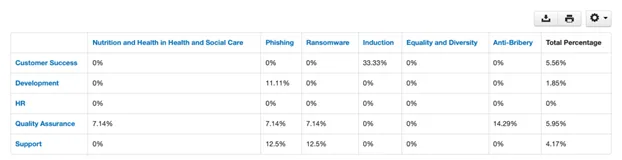
Module names are highlighted in blue. Selecting a module name will automatically generate the Module Compliance Report for that module. Similarly, departments are also highlighted in blue, and selecting a department will generate the Department Compliance Report.
As mentioned earlier, the Multi Department Compliance Report can also be run against groups within your LMS platform. These groups may be manually created or imported via a third-party source, such as your Azure tenancy (if configured). When selecting a group, the pop-up window also allows additional organisational data to be included in the report, such as location or job title.
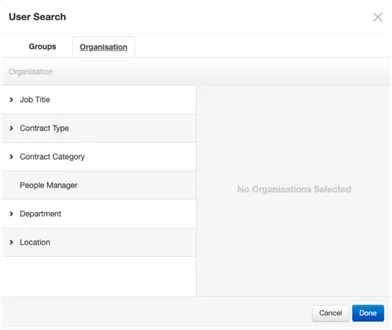
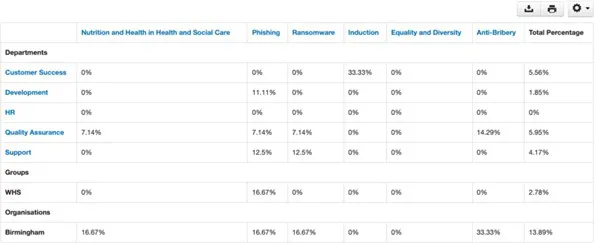
When using groups or other organisational data as part of the report, these entries are displayed in black and are not clickable links.
In the example below, a group called WHS and the location Birmingham have been included in the report. These headings are displayed in black and are not clickable.
Data Viewer
A new role, “Export to CSV”, has been introduced for the Data Viewer within Groups and Policies. This role allows learners to export their data to a CSV file. By default, this role is set to OFF.
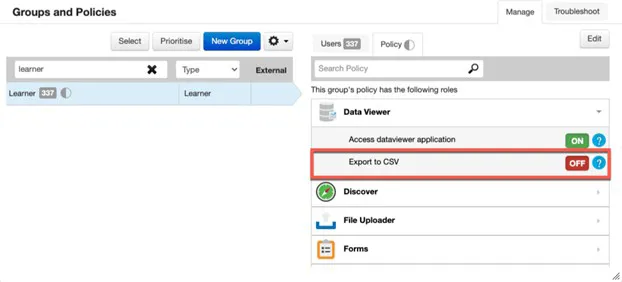
When the “Export to CSV” role is enabled for a group, and the Data Viewer widget is present on a site (e.g. displaying form submissions such as CPD appraisals), users will see a new “Export to CSV” option within the Action Cog. This allows them to download all of their visible form submission entries as a CSV file to their local device.
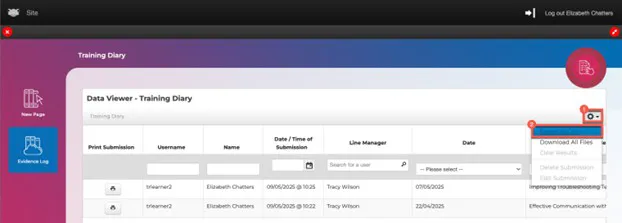
If a form includes fields that can be edited by managers, users with the “Export to CSV” role will also be able to export any data they have permission to view.
There is no change for admin users. When exporting data, admins will continue to receive all submission data and are not restricted in the same way as learners.
BUG FIXES
This release includes the following bug fixes:
Modules > Certificates
- JIRA# NFC-3560 - Module certificates have been enhanced to allow the inclusion of a valid until date. When the “Module Expires” option is toggled to ON, a learner’s certificate will display the date until which it remains valid (i.e. the renewal due date based on the module settings).
If you would like your LMS certificates to include this new module expiry option, please contact the Customer Success Team at customersuccess@frogeducation.com, who can review your current certificates.
Below is an example of how the certificate could look if the module expiry option is displayed.

Reporting Application
- JIRA# NFC-3571 - The Group Report, when exported to CSV, now includes additional fields to assist with data validation, particularly when a module is marked as compliance and the user is within their renewal period. The new fields are:
- Compliance
- Compliance Status
- Due / Expiry Date
- JIRA# NFC-3565 - The Module Compliance Report has been enhanced so that when the report parameter “Identity” is selected, the report returns data for users who are currently allocated to the module, as well as those who have a status of In Progress or Completed but have since been unallocated. This provides a more complete view of module completions, particularly where users may have moved departments and are no longer part of the module allocation.
When the “Identity” parameter is used, the report returns learner-level data only, based on the selected criteria.


Back to Community Home