


 Apprenticeships
 Construction
 Education Tech
 Engineering
 Franchise Networks
 Healthcare
 Legal Firms
 Logistics
 MATs
MATs Recruitment
 Retail
 Seasonal Staff
FrogLMS Community
Release Date - 21st July 2026
What's new in this release?
AICC Player
This release introduces support for AICC content within the Frog platform.
AICC content is primarily intended for LMS providers that need to integrate with the NHS England e-Learning for healthcare (e-LfH) hub. It works in a similar way to SCORM content, but is launched throughan embedded URL rather than being uploaded directly to the platform.
Unlike SCORM content, AICC does not return a percentage score. Instead, once the learner reaches the end of the content, completion information is sent back to Frog and the activity is marked as Completed within the AICC Player.
This feature is available upon request, as additional setup and configuration costs apply. To find out more about enabling this functionality, please contact the Customer Success Team at
customersuccess@frogeducation.com.
Template Manager
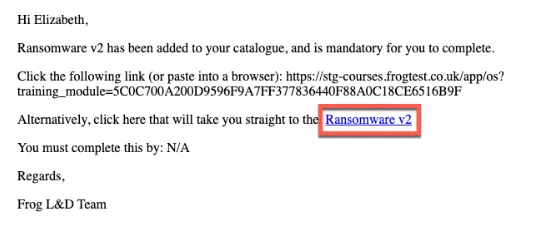
When editing a template, a new placeholder called Linked Name is now available. This displays the module name as a clickable link, allowing the recipient to open the module directly from the email.
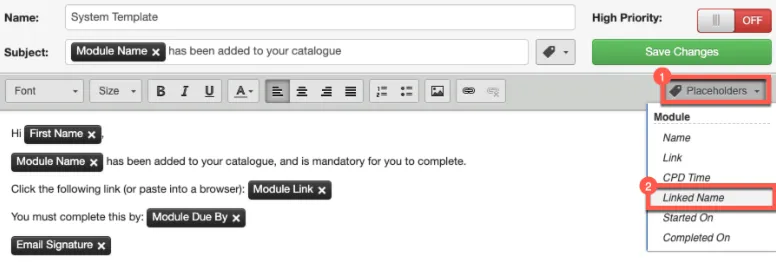
When the Linked Name placeholder is added to a template, it is displayed as Module Linked Name.
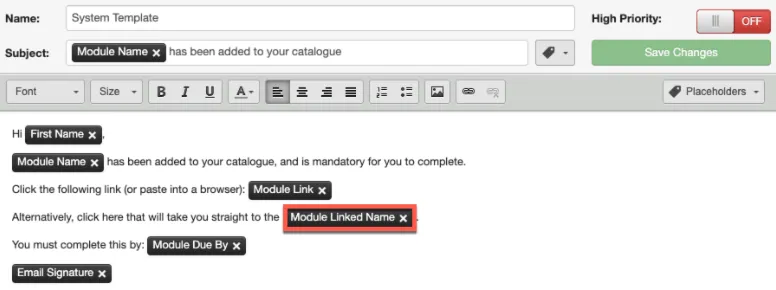
The example below shows how the email appears to the recipient. In this example, the module Ransomware v2 has been allocated to Elizabeth Chatters. The module name is displayed as a hyperlink, which the recipient can select to open the module directly.
BUG FIXES
This release includes the following bug fixes:
Data Viewer Widget
- JIRA# NFC-3585 - When options within a form field, such as a Dropdown, are added or
reordered, they are now displayed alphabetically when the form data is viewed within the Data Viewer widget on a site. Previously, these values could appear in an inconsistent order.
Event Widget
- JIRA# NFC-3611 – When managing a session within the Event widget, users added to the session are now displayed alphabetically by first name.
- JIRA# NFC-3584 – Resolved an issue where .ics attachments generated by the LMS could not be imported into supported calendar applications as events.
Forms
- JIRA# NFC-3557 – When form submission data contains special characters, such as £, emails generated using the “Notify On Submit”, “Send email to the person submitting the form”, or “Send email to the selected user” options now display those characters correctly.
Modules
- JIRA# NFC-3578 – Resolved an issue where administrators encountered an error when navigating to Notifications > Manage Notifications for a module containing a quiz, due to a missing quiz notification template. Template Manager will now open successfully and display all notification template options available for the selected module.
- JIRA# NFC-3540 – The names of the following activity widgets available when creating modules have been updated:
- Quiz Activity
- Text Submission
- File Submission
- JIRA# NFC-2937 – When a module is allocated to the Learner profile, any new users added to that profile will now automatically be given access to the relevant modules linked to that profile allocation.
Reporting Application
- JIRA# NFC-3601 – Performance improvements have been made to the Group Report when it is generated for all learners and includes a large number of modules. This resolves an issue where scheduled reports of this size could occasionally fail to generate as expected.
- JIRA# NFC-3586 – When exporting the Group Report as a CSV, the Job Title and Department fields now correctly handle commas within their values. Previously, if either field contained a comma, the CSV output was split across multiple columns incorrectly.
- JIRA# NFC-3576 – When the Module Compliance Report or Learner Compliance Report is exported as a PDF, mandatory modules are now identified with an M, while compliance modules are identified with a C.
Sites
- JIRA# NFC-3556 – Resolved an issue where site or page URLs containing the word “help” incorrectly launched the built-in Help content in a new browser tab. Sites and pages with “help” in the URL will now load as expected.
System Preferences > Azure > AAD user Sync
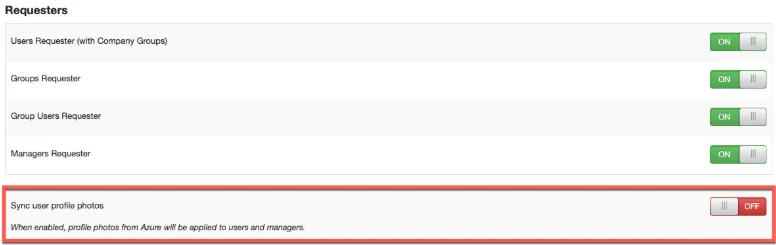
- JIRA# NFC-3453 – Azure user imports have been enhanced to support the import of profile photos stored in Azure. A new “Sync user profile photos” preference is available within System Preferences > Azure > AAD User Sync > Requesters and is set to OFF by default. To import profile photos, set the preference to ON. The photos will then be imported during the next scheduled Azure user import.
System Preferences > Training > Attendance Statuses
- JIRA# NFC-3546 – Earlier this year, the Event widget was enhanced so that a learner’s session attendance choice could be automatically reflected within the widget based on their response to the session enrolment invite sent to their local email client.
When a learner selects Accept, Decline, or Tentative within their email client, the LMS platform automatically updates the session attendance in line with their response.
This is a bespoke feature available upon request, as additional setup and configuration costs apply.
With this in mind, the following attendance statuses within System Preferences > Training > Attendance Statuses are now set to ON by default and cannot be disabled by an administrator, as they are required by the system:- Accepted
- Declined
- Tentative
System Preferences > Training > Training Certificates Widget
- JIRA# NFC-3545 – When the Training Certificates widget is placed on a site, it will now automatically refresh in the background when a learner completes a module. If a certificate is associated with the completed module, it will be displayed immediately within the widget without requiring the learner to refresh the whole platform.
System Preferences > Training > Template Manager
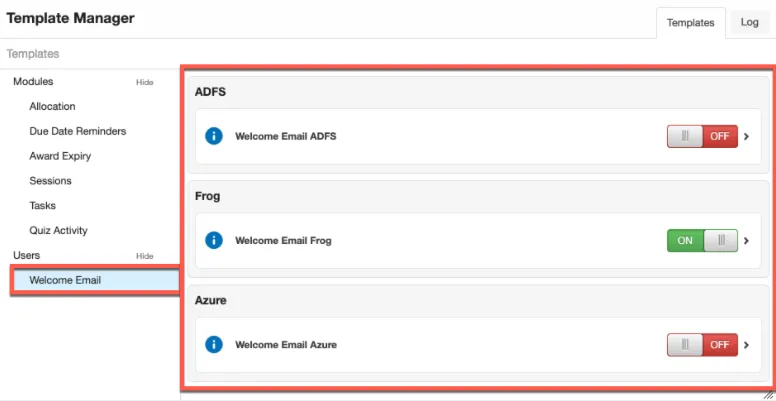
- JIRA# NFC-3529 – The “Welcome Email” section within Template Manager has been enhanced, allowing LMS customers to control whether a welcome email is sent based on how users are imported into Frog. The default settings are:
- Welcome Email ADFS – OFF
- Welcome Email Frog – ON
- Welcome Email Azure – OFF
To change a default setting, update the relevant toggle. The change will take effect immediately and will apply to new users imported from that point onwards.


Back to Community Home