


 Apprenticeships
 Construction
 Education Tech
 Engineering
 Franchise Networks
 Healthcare
 Legal Firms
 Logistics
 MATs
MATs Recruitment
 Retail
 Seasonal Staff
FrogLMS Community
Release Date - 16th March 2026
What's new in this release?
Event Widget
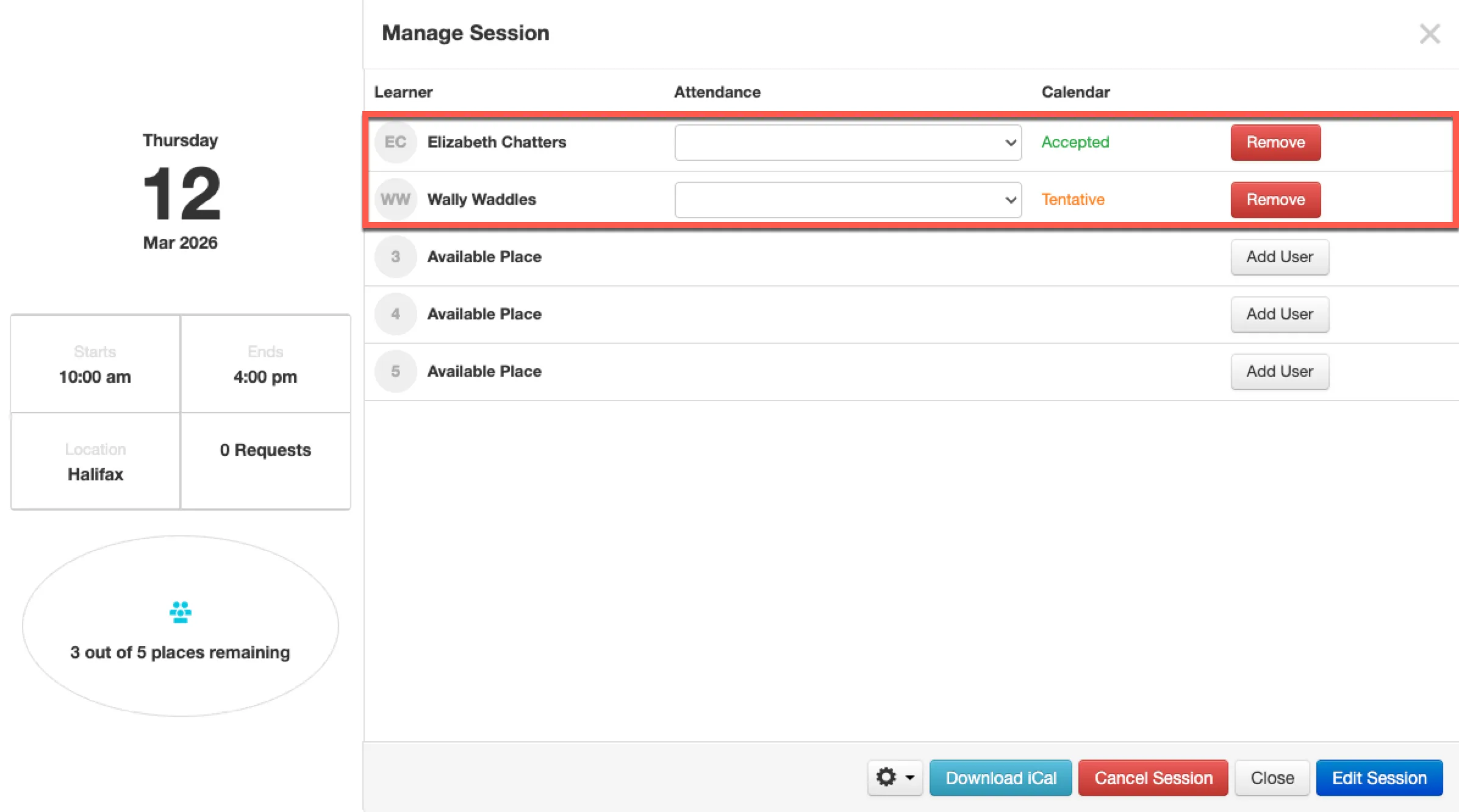
The Event widget has been enhanced so that a learner’s session attendance choice can now be automatically reflected within the widget based on their response to the session enrolment invite sent to their local email client. When a learner selects Accept, Decline, or Tentative within their email client, the LMS platform will automatically update the session attendance in line with their response. An example of this behaviour can be seen in the screenshot below.
This feature is available upon request, as additional setup and configuration costs apply. If you are interested in enabling this functionality, please contact the Customer Success Team at customersuccess@frogeducation.com.
For more information, please refer to the release notes document Event Widget Improvement
Module Session Report
Frog has introduced a bespoke report that allows session enrolment data to be exported to a CSV file. The Module Session Report is available to admin users only and provides the ability to:
- Export a CSV containing all session enrolments across the LMS platform.
- Export a CSV containing session enrolments with a session start date within a specified date range.
This feature is available upon request, as additional setup and configuration costs apply. If you are interested in enabling this functionality, please contact the Customer Success Team at customersuccess@frogeducation.com.
For more information, please refer to the release notes document Module Session Report
BUG FIXES
This release includes the following bug fixes:
SCORM Player Widget
- JIRA# NFC-3498 - The SCORM Player has been enhanced to support additional elements within SCORM 1.2 and SCORM 2004 packages. This enhancement primarily improves support for communication between SCORM packages and external online sources, ensuring that requests made by the package and responses returned to the LMS platform are handled correctly.
- JIRA# NFC-3521 - New tooling is now available to the Frog Service Desk to assist LMS customers in scenarios where a SCORM Player widget forms part of a module but was configured with an incorrect completion setting (for example, set to “Not Applicable”).
In cases where the SCORM activity had already been completed and a score recorded, updating the completion setting did not correctly reflect the learner’s score within the module or within reports. The additional tooling now available enables these situations to be corrected, ensuring that SCORM scores are accurately reflected for learners and within reports.
If you have any questions regarding the SCORM Player widget, please contact the Frog Service Desk, who can review your query and determine whether the new tooling can assist.
Reporting Application
- JIRA# NFC-3519 - The Group Report, when exported to CSV, will now display module names correctly. In some instances, special characters were previously displayed in place of whitespace.


Back to Community Home