

 Apprenticeships
 Construction
 Education Tech
 Engineering
 Franchise Networks
 Healthcare
 Legal Firms
 Logistics
 MATs
MATs Recruitment
 Retail
 Seasonal Staff
FrogLMS Community
Back to Widget Guides
CSV Table

CSV Table widget allows data from a third-party source to be displayed on a site that can then be shared.
This guide will give you an overview of the following:

Widget: Tutorial
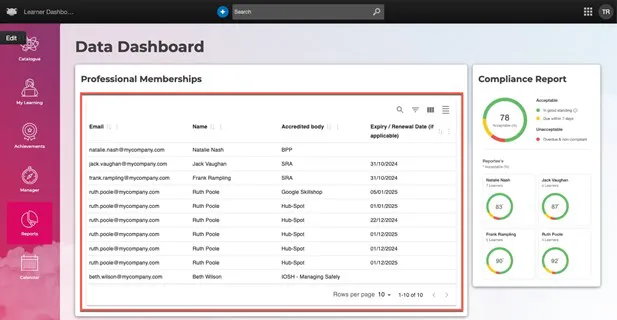
A CSV file can be added to the reports area for managers to view professional memberships alongside the Frog Compliance Report.
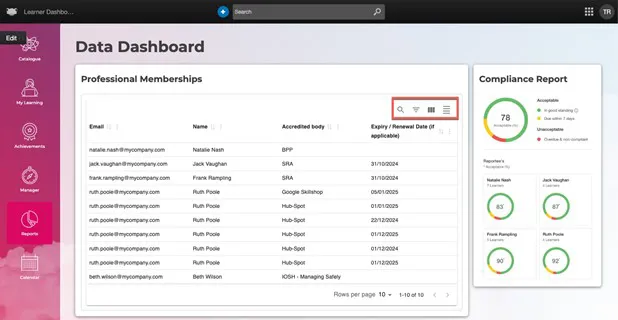
The CSV Table widget also allows users to complete the following functions:
- Search for data within the CSV
- Filter data by column
- Hide columns
- Toggle density – adjust the whitespace in the CSV display
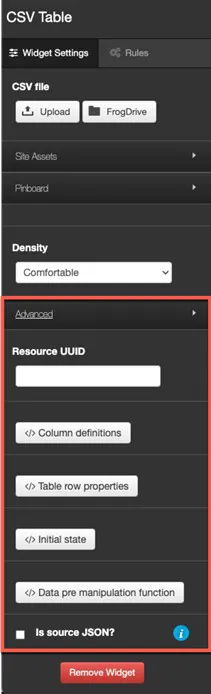
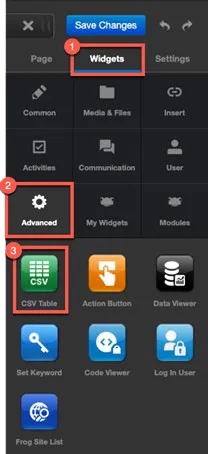
To add the CSV Table widget to a site, enter edit mode and navigate to Widgets > Advanced.
There are additional options available within the CSV Table widget settings under the Advanced section. If you’re interested in customising how data is displayed in the CSV Table widget, please contact the Frog Service Desk.